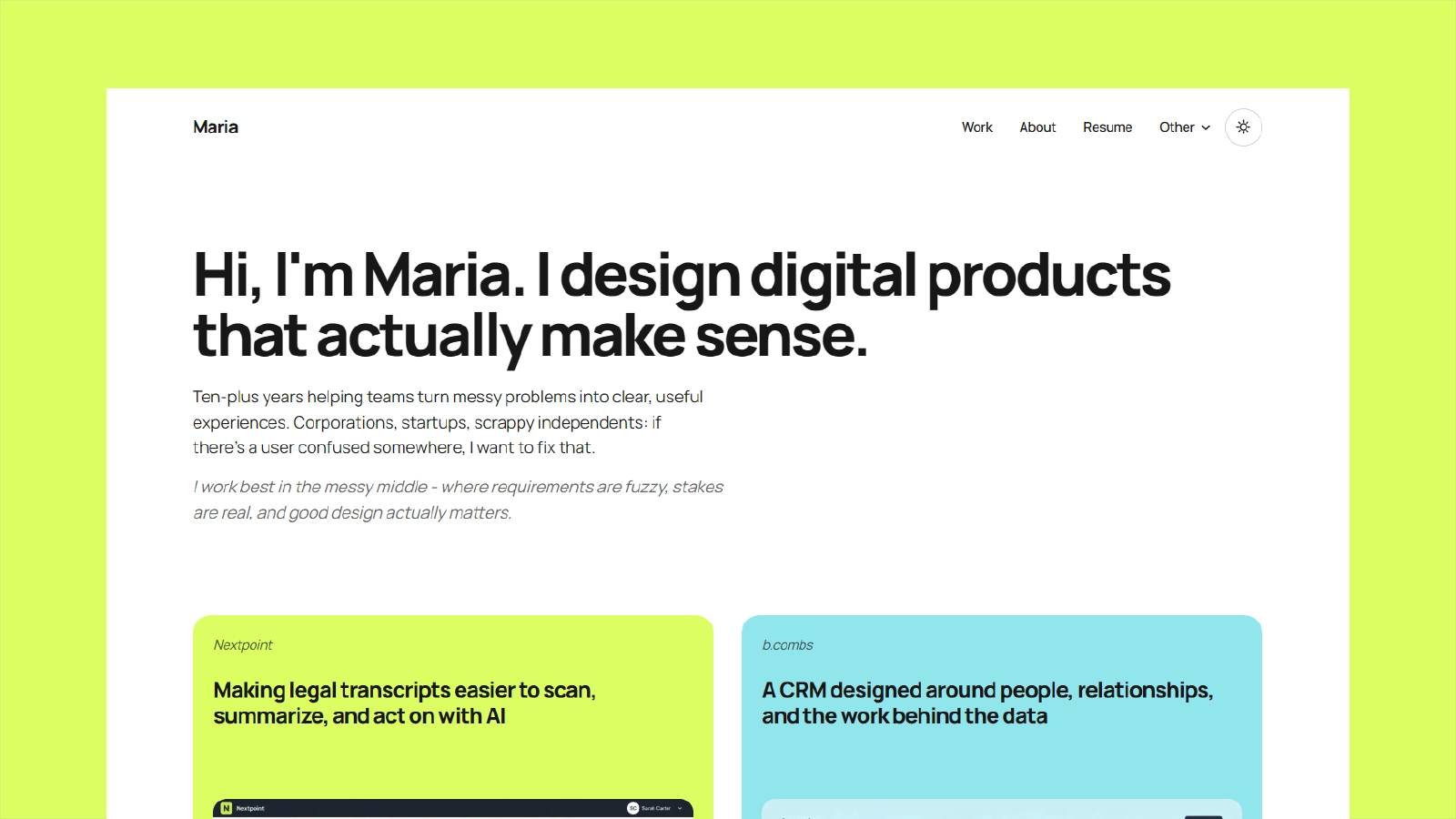




Preview: maria-lake.vercel.app
Maria is a clean Astro portfolio theme for UI/UX designers, product designers, and visual product thinkers.
It includes:
- a polished portfolio homepage
- a dedicated Works page with pagination
- a sample case study page
- About and Resume pages
- light and dark mode with a persistent header icon toggle
- cookie consent banner with saved preferences and a footer re-open action
- self-hosted tool logos on the Resume page
- Privacy, Terms, and 404 pages
- a dedicated Cookie Policy page
- shared header/footer/navigation
- Astro-optimized responsive portfolio images
- MDX support
- sitemap generation
- Open Graph and Twitter meta tags
- structured data defaults
- Netlify and Vercel config
- Astro 6
- Tailwind CSS 4 via Vite plugin
- MDX
@fontsource-variable/manrope
npm install
npm run dev
Build for production:
npm run buildPreview the production build locally:
npm run previewThe main template settings live in:
Update this file before publishing:
nametitledescriptionemailauthorNameauthorRole- social links
Set your production domain with an environment variable before publishing:
SITE_URL=https://your-domain.com- or
PUBLIC_SITE_URL=https://your-domain.com
This keeps canonical URLs, robots.txt, and the sitemap aligned without editing source for each environment.
The template includes:
- canonical URLs
- meta descriptions
- keyword meta
- Open Graph tags
- Twitter card tags
- sitemap generation
- dynamic
robots.txt - JSON-LD structured data defaults
noindexhandling for the 404 page
Main SEO files:

The theme includes a client-side cookie consent system with:
- a bottom banner for first visit consent
- a preferences modal with essential, analytics, and marketing categories
- saved consent in
localStorageundermaria-cookie-consent - a footer
Cookie Preferencesbutton for reopening the modal - a
Cookiespolicy page at/cookies
The theme also saves the visitor's color theme in localStorage under maria-theme.
- Essential storage is always active because it remembers theme and consent choices.
- Analytics and marketing are optional categories and default to off until the visitor opts in.
- The consent UI works out of the box even if you have not connected analytics or marketing tools yet.
The consent script exposes window.mariaCookieConsent in the browser:
window.mariaCookieConsent.getConsent();
window.mariaCookieConsent.hasConsent();
window.mariaCookieConsent.canUse('analytics');
window.mariaCookieConsent.canUse('marketing');
window.mariaCookieConsent.openPreferences();
Whenever a visitor updates their preferences, the site dispatches:
window.addEventListener('maria:cookieConsentChanged', (event) => {
  console.log(event.detail);
});Only load optional third-party scripts after checking consent. Example:
<script>
  if (window.mariaCookieConsent?.canUse('analytics')) {
    // load your analytics script here
  }

  window.addEventListener('maria:cookieConsentChanged', (event) => {
    if (event.detail.analytics) {
      // load or re-enable analytics here
    }
  });
</script>
If you add a new provider, also update:
- src/pages/cookies.astro
- src/pages/privacy.astro
- banner/modal copy in public/cookie-consent.js
Theme behavior:
- the site respects the visitor's system color scheme by default
- the header includes an icon-only theme toggle for switching between light and dark mode
- the selected theme is saved in
localStorage
Main pages:
//about/resume/work/work/nextpoint/privacy/cookies/terms/404
At the moment, Nextpoint is the only fully built case study page in the theme. The other homepage project cards intentionally point to /work/nextpoint as placeholders until you add their own case study pages.
Portfolio images live in:
Tool logos live in:
Notes:
- Portfolio and case study screenshots use Astro's image pipeline for responsive optimized output.
- Tool logos are self-hosted SVGs.
public/is reserved for files that should be served as-is, such as favicons and the Open Graph image.- Cookie consent assets live in public/cookie-consent.js and public/cookie-consent.css.
Included config:
If you only deploy to one platform, delete the other config file before wiring up CI so platform auto-detection stays predictable.
This project is licensed under the MIT License.
- Replace the example project copy and images with your own work.
- Set
SITE_URLorPUBLIC_SITE_URLbefore deploying so SEO URLs do not point to the demo domain. - The social share image is a template default and can be replaced with your own branded preview.